How to Preserve Your Family History Digitally
Learn how to preserve your family history digitally with the right formats, backup strategies, and tools that keep your data safe for decades.
Physical records don't last forever.
The photo box in the attic fades. Church records get damaged. The handwritten letter your grandmother kept falls apart at the folds.
Digital preservation was supposed to fix this. And it can — but only if you do it right.
Storing something digitally doesn't automatically mean it's preserved. It just means it exists somewhere, for now, in a format that may or may not be readable in 20 years, on a platform that may or may not still exist.
There's a difference between saving and preserving.
What Makes Digital Preservation Actually Work #
Three things determine whether your family history survives long-term:
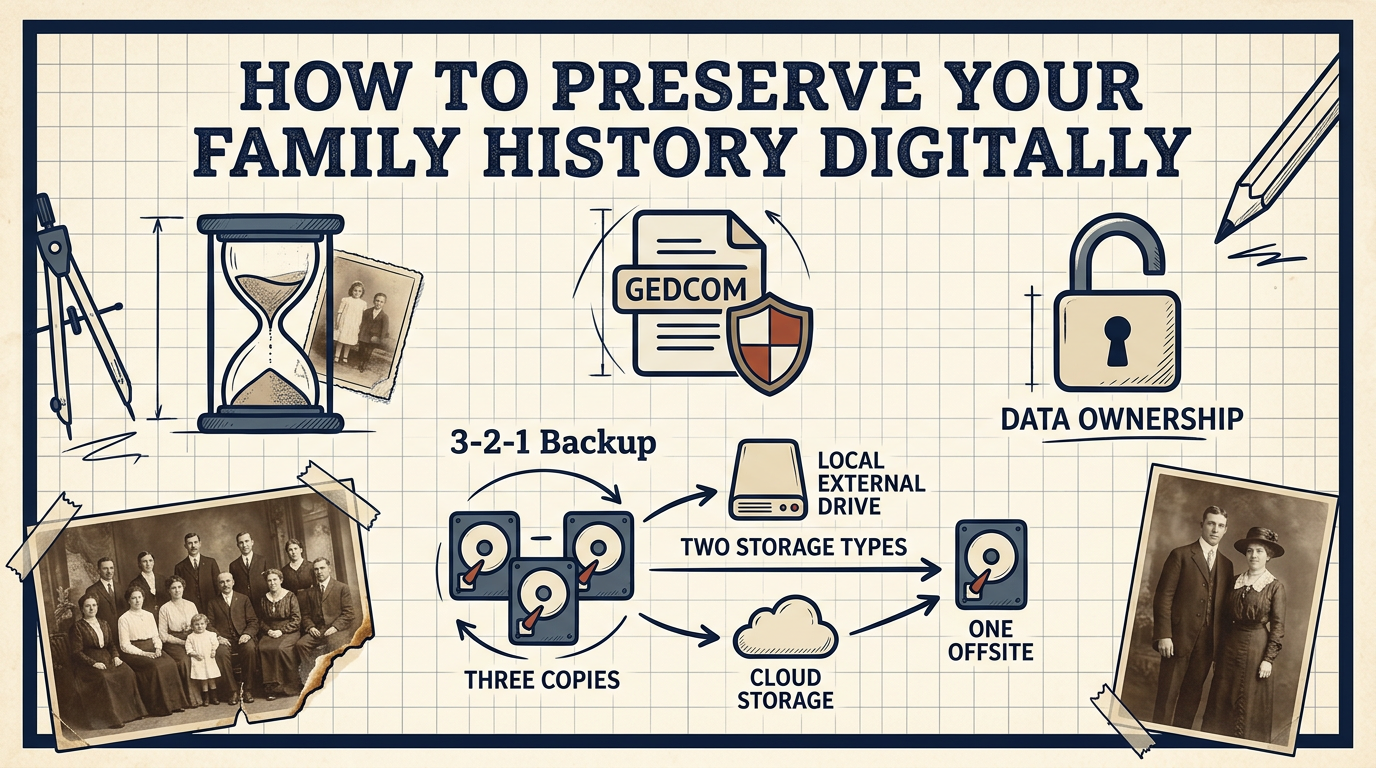
Format. Proprietary formats lock your data into a specific software. If that software disappears, your data becomes inaccessible. Open, widely-supported formats — like GEDCOM for genealogy data, JPEG or TIFF for photos, PDF for documents — are readable across tools and decades.
Redundancy. One copy isn't a backup. The 3-2-1 rule applies here: keep three copies, on two different storage types, with one stored offsite. A hard drive at home plus a cloud backup plus an external drive at a family member's house is a real preservation strategy. A single Dropbox folder is not.
Ownership. This is the one most people overlook. If your family history lives entirely on a platform you don't control, your data is only as safe as that platform's business model. Platforms change terms, get acquired, or shut down. If you can't export your data in a usable format at any time, you don't really own it.
For a deeper look at how genealogy platforms handle this, see Who Owns Your Family Tree Data?.
What to Actually Preserve #
Most people start with names and dates. That's the genealogy skeleton — necessary, but not the whole picture.
What actually makes a family history worth preserving:
- Documents: birth certificates, marriage records, immigration papers, wills
- Photos: digitized with enough resolution to print (300 dpi minimum), with names and dates noted in the filename or metadata
- Stories: the context behind the names. Who was this person? What did they do? What do family members still remember?
- Sources: where did you find this information? A source citation now saves hours of re-research later.
The stories are the hardest to preserve because they're not written down anywhere. Interviewing older relatives — even informally, even just a voice memo on your phone — captures things no archive ever will.
Choosing the Right Platform #
Not all tools treat your data the same way.
Some genealogy platforms are built around social sharing and discovery — your tree is part of a larger network. That's useful for collaboration, but it comes with trade-offs: your data is visible to others, it may be used to improve matching algorithms, and exporting it cleanly isn't always straightforward.
If long-term preservation is the goal, look for a platform that:
- Stores your data privately by default
- Supports standard export formats (GEDCOM at minimum)
- Gives you full control over who can access your information
- Doesn't rely on your data being public to function
famstory is built around exactly this idea — a private, secure space for your family history where you stay in control of your data. No public profiles, no discovery network. Just your family's story, preserved for the people who matter. Learn more about preserving your family history or private family tree software.
The Right Time to Start #
The uncomfortable truth about preservation: it gets harder over time, not easier.
Older relatives won't always be around to fill in the gaps. Physical documents deteriorate. Memories fade. The longer you wait, the more you'll be reconstructing rather than preserving.
The best system is one you actually use. Start simple — even a well-organized folder structure with scanned documents and a GEDCOM backup is better than nothing. Build from there.
FAQ #
What format should I use to preserve genealogy data? #
GEDCOM is the standard open format for genealogy data and is supported by most tools. For documents and photos, use PDF and JPEG or TIFF with sufficient resolution.
How many backups do I need? #
Follow the 3-2-1 rule: three copies, two different storage types, one offsite. This protects against hardware failure, theft, and local disasters.
Is cloud storage enough for family history preservation? #
Cloud storage adds redundancy but shouldn't be your only copy. Also consider whether you can export your data in a usable format if the platform changes or shuts down.